
RBI Office Attendant Recruitment 2026; Reserve Bank of India (RBI) has released the Office Attendant Recruitment 2026 notification to fill 572 vacancies across various RBI offices in India. Candidates who have passed Class 10 are eligible to apply. The online application process starts on 15/01/2026 and ends on 04/02/2026. Selection will be done through an online examination followed by a Language Proficiency Test.
Table of Contents Show
RBI Office Attendant Recruitment 2026
| Organization Name | Reserve Bank of India |
| Post Name | Office Attendant |
| Advertisement No. | Office Attendant 2026 |
| Job Category | Banking Job |
| Total Vacancy | 572 |
| Apply Mode | Online |
| Apply Start | 15/01/2026 |
| Last Date Apply | 04/02/2026 |
| Last Date for Payment of Fee | 04/02/2026 |
| Selection Process | Online Exam, Language Proficiency Test |
| Exam Dates | 28/02/2026 and 01/03/2026 |
| Salary | Approx. Rs. 46,029 per month |
| Official Website | www.rbi.org.in |
Vacancy Details
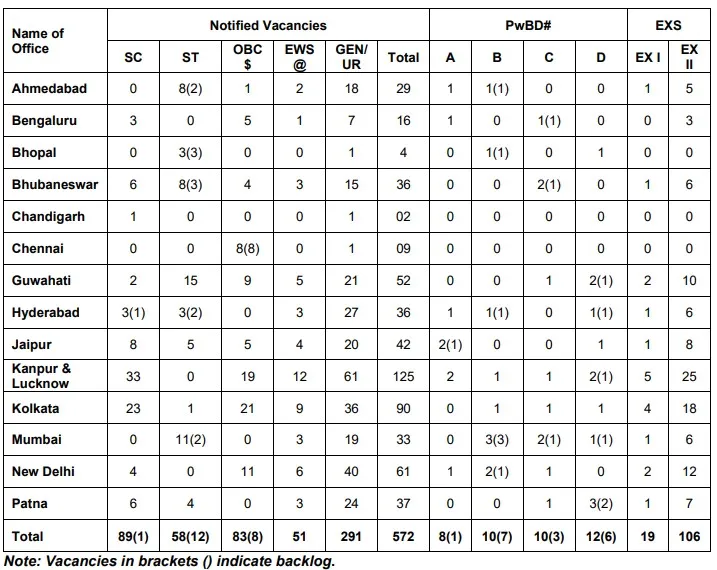
Eligibility Criteria
Candidates must meet the eligibility conditions as on 01/01/2026.
Educational Qualification
- Must have passed Class 10 (SSC/Matriculation) from a recognised board
- Candidates with graduation or higher qualification are not eligible
- Applicant must be domiciled in the State or UT of the RBI office applied for
Age Limit
- Minimum Age – 18 years
- Maximum Age – 25 years
Age relaxation is applicable as per Government rules for reserved categories.
Application Fee
| SC ST PwBD Ex Servicemen | Rs. 50 plus GST |
| General OBC EWS | Rs. 450 plus GST |
| RBI Staff | No Fee |
Selection Process
The RBI Office Attendant Recruitment 2026 selection process includes the following stages:
- Online Examination
- Language Proficiency Test in the local language
- Document Verification and Medical Examination
Final selection will be based on performance in all stages.
How to Apply
- Visit the official website www.rbi.org.in
- Open the RBI Office Attendant Recruitment 2026 notification
- Complete new registration using a valid email ID and mobile number
- Login and fill the online application form carefully
- Upload photograph and signature
- Pay the application fee if applicable
- Submit the application form
- Download and save the confirmation page